
With so much content out there, and so little time, reading a full article just seems like such a daunting task. But one tool is supposed to help instantly make you read faster. It’s called Bionic Reading, and here’s how it works.
What is bionic reading?
it’s incredible how reading this feels like finally unlocking 100% of your brain
(via @christophepas) pic.twitter.com/nU6CblVZWT
— juan (@juanbuis) May 18, 2022
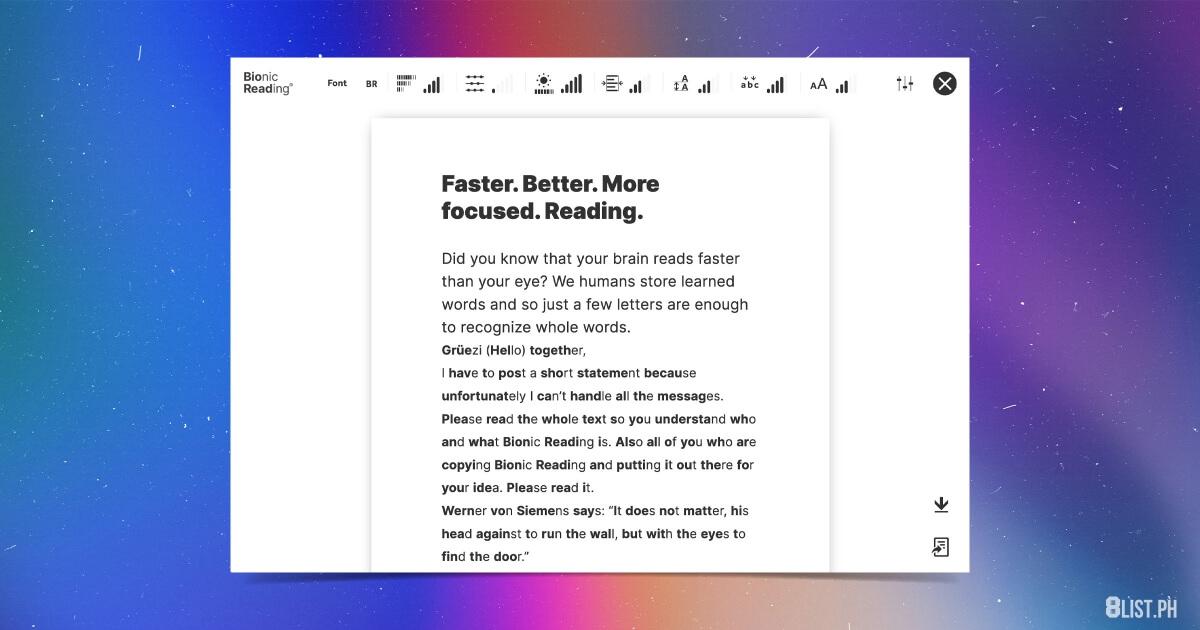
Created by Swiss developer and typographic designer Renato Casutt, Bionic Reading is an approach to typography that aims to make reading easier and more efficient by “guiding the eyes through artificial fixation points.”
How does it work?
What do “artificial fixation points” mean? Those are the bolded letters in the text. Bionic Reading puts the first few letters of a word in bold type (depending on how long the word is) to serve as these “artificial fixation points” that draw your eyes in. In theory, this allows your eyes to focus on these bolded letters and allow your brain to quickly catch up and complete the rest of the word. This, in turn, reduces the number of letters your eyes need to actually look at, which would then ideally, make reading a breeze.
Where can you use it?
As of writing, there are only limited apps that have it built-in, as Bionic Reading is still a new tool still continuously being developed by a small team. It is currently restricted to iOS and MacOS apps, namely: Reeder 5, Lire, and Fiery Feeds.
After a Twitter user with a big following shared the concept online, Bionic Reading went viral a few days ago, catching a lot of attention from netizens worldwide. Unfortunately, it also drew criticism for “putting [accessibility] behind a paywall”. But since then, the developer has launched a converter and a web browser extension.
There’s a free converter …
Hey guys, we have some news!
The Bionic Reading® Converter. For free.
—
Bionic Reading® the original for you.
This is how it works: Insert text or link. Click “Show” or upload text file and read it in Bionic Reading.
—
Try out now!https://t.co/tk2RJQjtcH pic.twitter.com/6aOG2ISC3C— Bionic Reading (@bionicreading) May 22, 2022
For non-developers and casual users, Casutt released a free converter to the Bionic Reading type. You only need to upload your file into the online converter, and it will automatically convert the text into Bionic Reading. It accepts TXT, RTF, RTFD, EPUB, and DOCX files. (Got a PDF or other file? You can simply convert it to an EPUB or a DOCX file.)
… and a Chrome extension
Hi together,
NEW: BR Chrome Extension.
The official Bionic Reading® method in your browser.
Try out now!
👉 https://t.co/NUipNWn7ar pic.twitter.com/d1X0kxGv2b— Bionic Reading (@bionicreading) May 27, 2022
The tool is now available as a Chrome extension, which means you can try Bionic Reading on both Google Chrome and Microsoft Edge. However, it’s best to note that this extension is still in its beta stage, so it might not run as smoothly as you might hope.
Does it really work?
Testimonies are a mixed bag. Some say it made them feel like a robot reading the text, since the bold text makes them pause. But there are others (especially those with ADHD and dyslexia) who say it works, helping them read in a breeze. Daniel Lavelle of The Guardian said that it “could have benefited [him] at school” when he had to read so much more text.
So should you use it?
You’re really the one who can answer this question. Is reading in this style helping you understand the text more quickly? If yes, give it a go. If no, then maybe it’s not for you. You can also wait for more formal studies to come out. But if you want to try it, you can use the converter or Chrome extension to read larger sizes of text.
Try it yourself
You can find their products on their website, including the Bionic Reading API (with its pricing scheme) for developers who want to use it in their apps. The Bionic Reading converter can be found here, while the Bionic Reading Chrome extension is here.
Follow us on Facebook, Twitter, Instagram, Tiktok, and Youtube for the l8est entertaining, useful, and informative lists!
The post Bionic Reading: The Hack That Will Instantly Boost Your Reading Speed appeared first on 8List.ph.
Bionic Reading: The Hack That Will Instantly Boost Your Reading Speed
Source: Pinoy News Anchor


0 Comments